Exporting and publishing
What LUFS should my podcast be?
Apple Podcasts wants −16 LUFS; Spotify and YouTube want −14 LUFS; broadcast (EBU R128) wants −23 LUFS. Most tools make you type that number in. Cast ships the target with the platform — pick where you are publishing and it normalizes to that, with true peak at −1 dB. (Master is the exception: no normalization, no ceiling — untouched on purpose.)
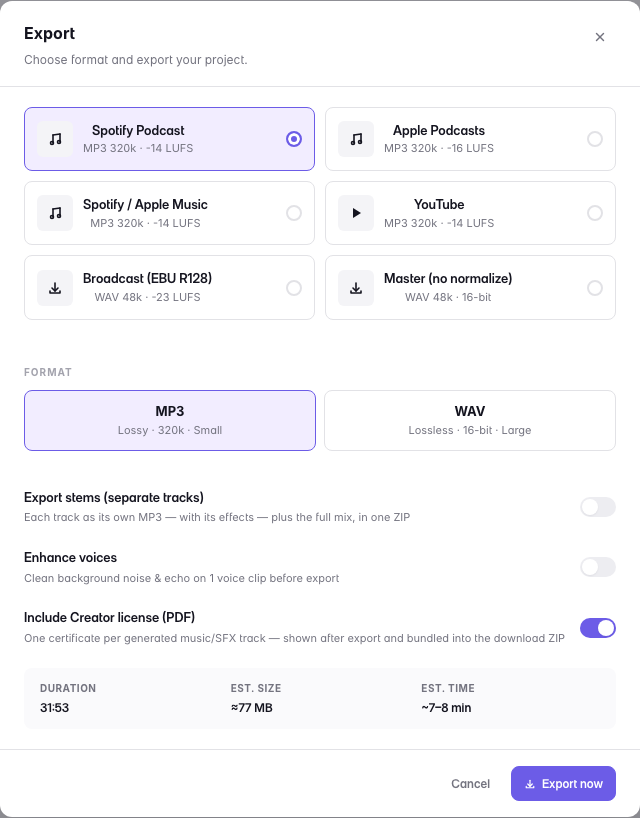
Loudness normalization is why one podcast sounds as loud as the next one in a listener's feed. Every platform re-levels what you upload; hitting its target yourself means it does not have to, so your episode arrives sounding the way you mixed it instead of being turned down by an algorithm.
If someone else is going to master the audio, export with Master, which applies no normalization at all.
The MP3 presets render at 320k on Lite and above; on Free the same presets render at 128k — the loudness target is identical.
- Spotify Podcast−14 LUFS · MP3 320k
- Apple Podcasts−16 LUFS · MP3 320k
- Spotify / Apple Music−14 LUFS · MP3 320k
- YouTube−14 LUFS · MP3 320k
- Broadcast (EBU R128)−23 LUFS · WAV 48 kHz · Max plan
- MasterNo normalization · WAV 48 kHz, 16-bit
Last updated