

Voice Editor
Clean the mess
Find fillers, long pauses, repeated words, hesitations, and noisy moments without hunting for them manually.
Cut words, not waveforms
Edit the transcript like text. Remove a phrase, tighten a segment, fix the structure.

Mubert Cast is an audio-first podcast editor with commercially licensed music built in — plus transcript editing, voice cleanup, chapters, adaptive music with auto-ducking, and SFX.
Free to start, no credit card. Built for audio-first podcasts. No video timeline. No stock-music rabbit hole.

( Creating :-)
Upload the raw recording — from there the whole edit happens in the transcript


Clean · Edit · Score · Export — No DAW · No video timeline · No stock music
( Features )
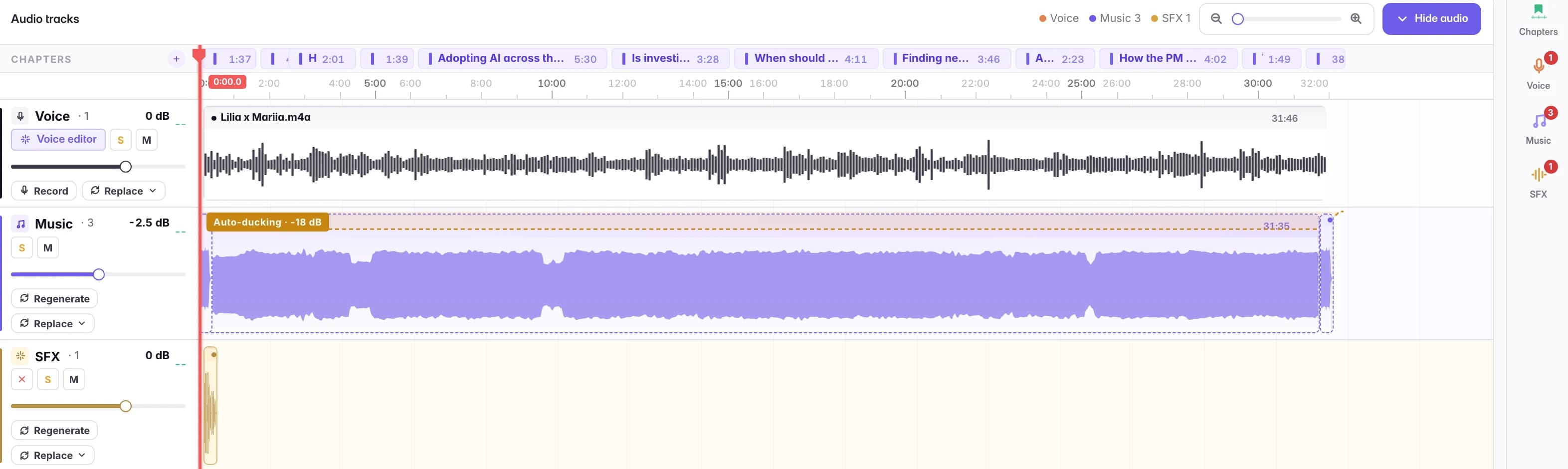
Intro, outro, transitions and beds — original music made for this episode. It matches the length you need and ducks under the voice automatically.
Select words in the transcript and the audio follows — cut them, mute them, or fix the wording. Chapters, speakers, pauses and fillers live in the same text.
AI Noise Remover scrubs the hiss and hum; Enhance voice lifts the voice clean out of its background and levels the loudness. Cast also flags every long pause, filler and mouth sound for a one-click cut.
Publish with commercially licensed music — every export on a licensed plan ships its own license record.
( Problem :((

Recording is the easy half. Finishing is where podcasts get stuck.
You hit stop. The conversation was good. But now there’s the part nobody looks forward to. The awkward pauses. The “uhms”. The section that should be shorter. The intro you still don’t have. The background music that sounds like every other creator used it already. The licensing question you would rather not think about.
:((
Mubert Cast puts that last mile in one place: clean the voice, shape the episode, add music, export.
Start with your recording
( How it works ! )
Drop in the recording.
Find fillers, long pauses, repeated words, hesitations, and noisy moments without hunting for them manually.
Edit the transcript like text. Remove a phrase, tighten a segment, fix the structure.
Generate background music, intros, and outros for each part of your episode. Pick the vibe; the track comes back sized to the segment and ducks under the voice.
Drop in transitions, stingers, ambient textures, and SFX right where you need them. Fine-tune timing and volume per segment.
One finished file, normalized to the platform you pick — Spotify, Apple Podcasts, or broadcast EBU R128.
Vocals, music and SFX as separate tracks (Plus & Max).
( Transcript Editing /// )
Waveforms are great for engineers. Words are better for everyone else.
Mubert Cast turns your recording into a transcript, so you can find the messy parts fast and clean them in context.
Delete the sentence. Cut the audio.
Or mute instead of cutting — the words drop out, the timing stays.
Shorten the dead air.
Tighten slow moments without making the episode feel chopped up.
Chapter the episode.
Find the filler words and mouth clicks.
Jump straight to "um", "uh", "like", and other verbal clutter.
Keep speakers organized.
Say who is talking once — Cast labels the rest of their lines.
Break the show into sections while the structure is still fresh in your head.
( Voice Cleanup ... )
A good podcast does not need to sound fake-polished. It just needs to stop fighting the listener. Cast cleans up the things that pull people out of the conversation: noise, uneven pacing, long silences, mouthy bits, repeated words, and filler sounds.
Reduce background noise so the voice sits closer.
Shorten the pauses that make the episode drag.
Remove fillers and repeated words when they get in the way.
AI helps you find the problems. You decide what gets cut.
( Music ♭♭♭ )
Music is where a podcast starts to feel like a show. With Mubert Cast, you do not have to search through stock libraries, trim random tracks, or wonder whether the license will become a problem later.
Generate music inside the same workflow where you edit the episode.
Give the first seconds of your show a recognizable sound that listeners associate only with you.
Move between guests with intention.
End cleanly instead of fading.
Add music under speech without burying it — the bed ducks when you talk.
Creator commercial license on Plus & Max, with a license record on every export.
Generate music for the exact moment you need, down to the second, rather than forcing your edit to fit a stock loop.
( License )
Music you generate in Cast comes with a commercial license on Plus and Max, and every export carries its own license record — the document you point at if a platform, a client or a rights holder asks where the music came from.
Every account starts with a sample episode — clean it, score it and export it before you upload anything of your own.
( Who It's For )
Cast is for audio-first creators who want a finished episode without learning a full DAW or stitching five tools together.
Solo hosts

One person, every role. Cast finds the fillers, generates the music, and sets the loudness — so editing stops eating the whole evening.
Interview shows

Cut the rambling by deleting sentences in the transcript; the pauses close on their own and the chat still sounds live.
Narrative podcasts

Score every chapter with music generated for it — intro, transitions, beds under the narration — without touching a DAW.
Educators and experts

Cut the tangents in the transcript, chapter the topics, and level the loudness — a long recording becomes an episode people finish.
( Export ↑↑↑ )
When the edit feels right and the music fits, export the finished episode as one audio file, normalized to the platform you pick — Spotify, Apple Podcasts, or broadcast EBU R128. Upload it to your host, send it to a client, or share it with your community.
Finish your first episode( Mubert Ecosystem )
Fuse, Render and Cast run on the same Mubert engine: social-first audio, standalone music, and long-form podcast finishing. One subscription, one credit balance.
Turn short audio into polished social content. Merge, edit, and export in minutes.
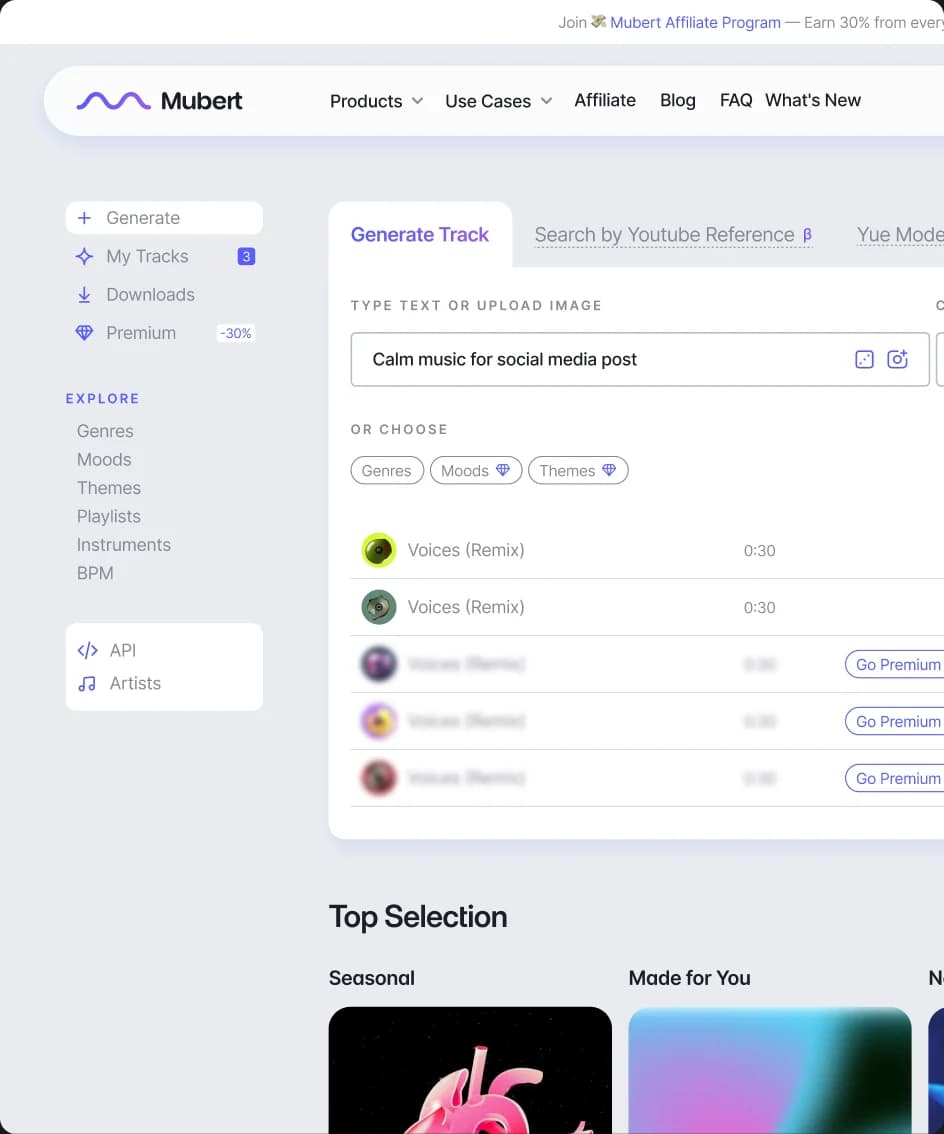
Generate standalone music on demand — from loops to full tracks, at the length you set.
You are here. Cast finishes long-form episodes: transcript editing, generated music, and a commercial license on export.
Upload your recording, clean the rough parts, add licensed music, and export a finished podcast episode.
Credits work across every Mubert tool. Upgrade for more credits, higher-quality exports, and commercial licensing.
$0/mo
100 credits / month
$4.99/mo
700 credits / month
$14.99/mo
2,750 credits / month
$29.99/mo
6,500 credits / month
Credits are spent only on generation — music from 5 credits per track, sound effects from 10.
Editing, transcription and export never cost credits, on any plan.
Prices are shared across the Mubert ecosystem · billed via Stripe · cancel anytime · 100 credits ≈ $1.
8 items
Yes — but the better way to think about it is a podcast finisher. It helps you clean voice, edit by transcript, add music, and export a finished audio episode.
Read more →No — Cast is audio-first on purpose: there is no video timeline, and video files are rejected. Bring the audio track of your show; captions and chapters export as sidecar files you can publish alongside the video.
Read more →Yes. Hesitations — "um", "uh", "mm" — are flagged by default and you can cut them all in one click. Every cut is snapped to a quiet point in the waveform, so the edit lands between the sounds instead of through them.
Read more →Yes — select any run of words and a menu appears: delete them (the audio is cut and the gap closes), ignore them (the audio is muted, the timing stays), correct the wording, mark a chapter, or assign a speaker.
Read more →Yes. Describe what you want, pick what kind of track it is — a background bed that loops, an intro/outro, or a short sting — and Cast generates an original track for the episode. Once it is on the timeline it ducks under the voice automatically.
Read more →Yes — music you generate in Cast comes with a commercial license on Plus and Max, and every export made on those plans carries its own license record. Free music is only free until a platform, a client or a rights holder asks where it came from; here you have the answer on file. (Free and Lite have no commercial license, and music you upload yourself is yours to clear.)
Read more →Yes — upload it tagged as Music and it lands in your Library, ready for a music lane in the editor. Once on the timeline it behaves exactly like generated music: it ducks under the voice automatically. Cast will not license music you brought yourself — clearing third-party tracks is on you.
Read more →A finished MP3 or WAV, normalized to the loudness of the platform you pick — exporting costs no credits, on any plan. On Plus and Max you can also switch on stems and get a ZIP of the separate parts of the mix alongside the full episode.
Read more →
Ready when you are