Audio Editing Apps
End the copyright worry: Mubert delivers unlimited, royalty-free Audio Editing Apps for stress-free content creation.
The problem
Audio Editing Apps
Problem
Exports blocked by music claims
A user drops a popular song into your editor, exports, and posts. The platform mutes the audio or files a claim. They blame your app, and you field the support tickets for a rights problem you never caused.
With Mubert
Mubert generates original tracks inside your editor, so users never need to import someone else's song. Each user gets their own customer-id and access-token, and their usage counts against your license.
Problem
Tracks never match clip length
A 43-second reel and a 3-minute track don't line up. Users trim, fade, and loop by hand, and the seams show. Many give up and ship the clip with silence or a mismatched cut.
With Mubert
Set the duration before generating, from 15 seconds up to 25 minutes, and add BPM, genre, and mood. The track comes back as MP3 or WAV at the length the timeline needs.
Problem
Slow search, same stock tracks
Scrolling a stock library for the right mood eats editing time, and the track that finally fits is one thousands of other creators already used. Videos start to sound alike.
With Mubert
Users generate from text, an image, or a mood, or filter about 12,000 pre-generated tracks by genre, mood, activity, or BPM. Webhooks tell your backend when a track is ready, and like and dislike feedback personalizes later results.
Apps
By the numbers
Paid in 2024 for music at live events and in hotels, restaurants and shops
Damages publishers sought from Peloton over songs used without licenses in its classes
Damages publishers sought from Roblox over unlicensed music in user-made games
Audio Editing Apps
How it fits your product
Audio editing apps need music that users can cut, layer and trim without it fighting their voice recordings. Keep the energy low to medium, with a steady tempo around 85 to 100 BPM and clear, repeatable bars so edit points land on a beat. Soft keys, light drums and a muted bass leave room for speech. Offer one-minute beds that loop cleanly, so a clip of any length can be filled.
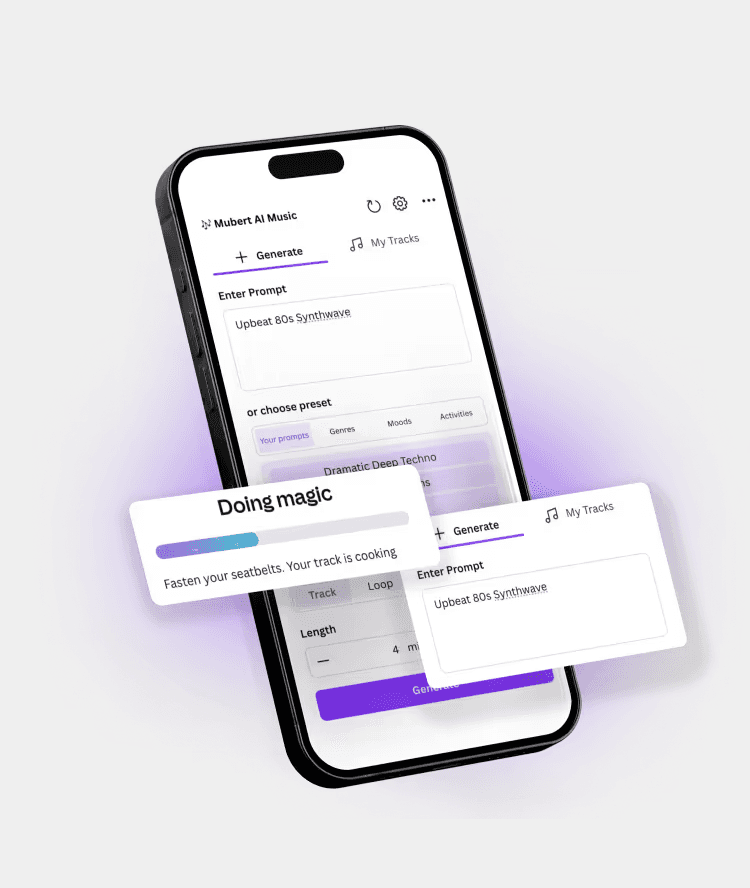
For an editing app, start with track generation. Your backend calls the Mubert API with a prompt, BPM, genre and mood, picks a duration from 15 seconds up, and receives MP3 or WAV once a webhook says the track is ready. Create a customer for each user, so their music requests use their own customer-id and access-token and count against your license. Use the library of about 12,000 tracks for instant browsing.
With the Mubert API
Mode
Track
Length
1:00
Tempo
85-100 BPM
Mood
calm, neutral, steady
Example prompt
Light lo-fi beat, soft electric piano, steady 90 BPM, neutral bed for editing app templates
More prompts to try
Warm acoustic guitar and light percussion, 100 BPM, upbeat intro for podcast editor
Minimal ambient pads, slow 70 BPM, quiet background for voiceover editing
Punchy electronic pulse, bright synths, 125 BPM, energetic bed for short video edits
Features
What you get
200+ Music Channels
Predefined channels for different app use cases
Enterprise Scalability
Supports high-volume usage, generate millions of tracks
Dataset-Compliant Generation
Built on verified proprietary legal datasets, safe to use anywhere
FAQ
Audio Editing Apps
What kind of music works best as a background track in an audio editing app?
Low to medium energy music with a steady tempo and few competing melodies works best, because users layer it under voice. Mubert tracks can be generated from a text prompt, BPM, genre and mood, in lengths from 15 seconds up to 25 minutes, delivered as MP3 or WAV.
How does an audio editing app give each user their own music access?
Your backend creates a customer for each user through the Mubert API, which returns a customer-id and access-token. That user's requests run under their own credentials, and their usage counts against your license. Webhooks tell your backend when a requested track is ready to download.
More use cases
Pricing
Transparent & Flexible
Blog