

Of the 153,767 podcasts launched in the first half of 2026, 41.7% have already gone quiet (Podchaser, June 2026). Not because the hosts ran out of ideas. Because they ran out of Sundays.
Ask around and you’ll hear the same story: the show was supposed to be a one-hour-a-week hobby, and somehow it became five-plus hours per episode (Podbean, 2025). The episode is recorded by Tuesday — then comes the editing, the music hunt, the loudness question, the show notes, and the growing suspicion that this is a second job that pays nothing.
Here’s the thesis of this guide: most podcasts don’t die of bad content. They die of production friction. Every hour between “recorded” and “published” is an hour that erodes the habit — and the habit is the show. So this isn’t another list of “believe in yourself and buy a better mic.” It’s the ten podcasting challenges that actually stall shows, what people use to solve them today, why those fixes only go halfway — and what a modern workflow looks like. Including one problem almost nobody writes about (it’s #3).
The short version: the ten biggest podcasting challenges are editing time, filler words, profanity and the explicit tag, audio quality, music licensing, music-voice balance, loudness standards, transcripts and captions, consistency, and growth. Here’s each one — with the honest fix.


1. Editing eats your week — or your budget
The most universal pain in podcasting has a price tag with two currencies. Pay in time: practicing editors budget 3–5 minutes of editing per minute of audio (Produce Your Podcast) — Buzzsprout’s advice to new podcasters is to plan at least 4× the episode length (Buzzsprout, 2026). That’s a full afternoon for a one-hour show. Or pay in money: hand it to an editor or a production service, per episode, forever.
Either way, the cost lands on every single episode. It’s the tax that turns a hobby into a chore — in The Podcast Host’s survey of 260 podcasters, editing ranked third among the places podcasters get stuck, behind only promotion and planning (The Podcast Host, 2021).
The half-solutions: outsourcing works but never gets cheaper. Transcript-based editors like Descript proved a better idea — edit the text, not the waveform — but they stop at the cut: music, levels, and packaging still happen somewhere else.
The fix: do the whole episode where the transcript is. In Cast, Mubert’s podcast studio, your recording (record right in the app, or upload) becomes an editable transcript: delete a sentence and the audio is cut, rewrite a phrase and the timeline follows. No waveform-scrubbing to find “that part around minute 34” — it’s text, so you search it. Transcription and editing are free on every plan.
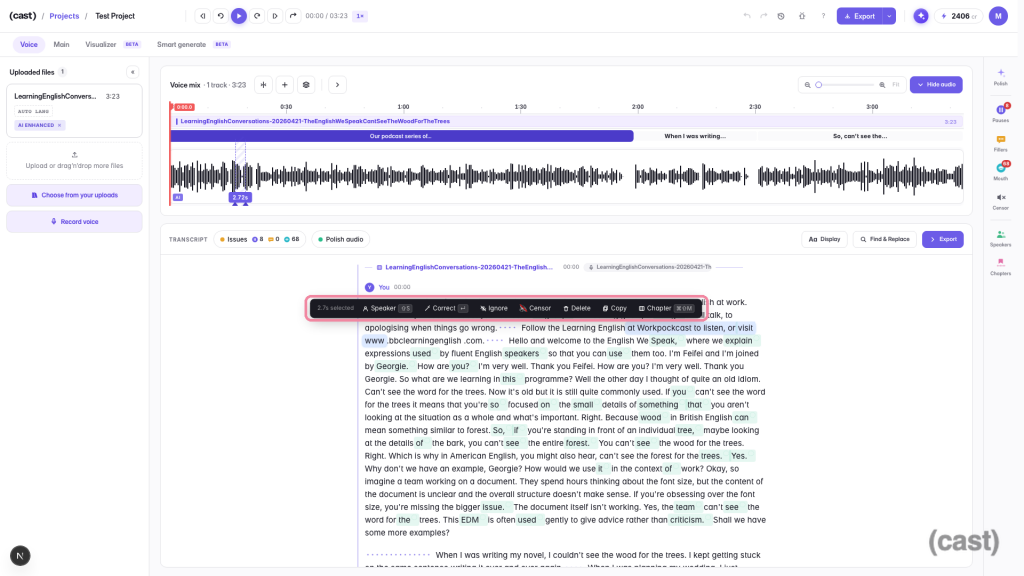
Selecting a sentence surfaces a toolbar with Delete, Ignore and Censor
2. Ums, uhs and dead air
Should you edit out the ums? Mostly, yes — a few are human, a wall of them is noise. The problem is that hunting fillers by ear is the most mind-numbing part of the edit: listen, stop, cut, repeat two hundred times.
The half-solutions: doing it manually in Audacity (free, endless), or not doing it at all and hoping listeners don’t count.
The fix: this is exactly what dictionaries are for. Cast detects filler words and long pauses across the whole episode and shows them as a list — review each with its context, then cut or mute in a click, individually or all at once. Pauses have a live threshold, so you decide what counts as “dead air” and what’s a dramatic beat. The transcript stays readable either way.
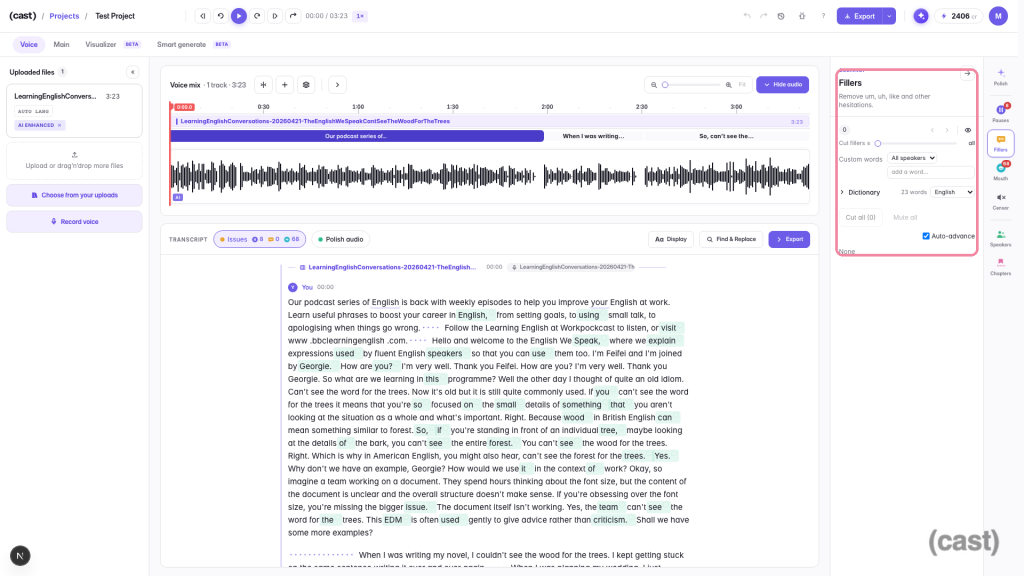
The Fillers panel with its dictionary and threshold slider
3. Swearing, sponsors, and the explicit tag (the problem nobody writes about)
Here’s the one you won’t find in any “podcasting challenges” listicle — until a sponsor asks for a clean version, or Apple asks you to label the show explicit, and you discover what censoring audio by hand involves: find every swear by ear, cut in a beep, check the levels, repeat. For a talkative episode, that’s an evening gone. Meanwhile the money question is real: podcast ad buyers steer budgets toward brand-safe shows and skip ones with heavy profanity (Inside Radio).
The half-solutions: the big podcast editors don’t do this. Descript removes your “ums” but won’t bleep anything automatically; the workaround is standalone web tools built for video clips — upload your file to a separate site, download the bleeped result, bring it back into your editor. One more tool, one more export, every episode.
The fix: censoring belongs inside the transcript, where the words already are. Cast scans your episode against profanity dictionaries in the episode’s language, lists every hit with context, and censors them all in one click — or word by word, if some usage is fine in your show. Add your own terms to the list (a client’s name, a spoiler), whitelist words it should never flag, and pick the mask per word: three classic beeps, white/brown/static noise, or crackle. The censored word is masked in the transcript and captions too, so the clean version is clean everywhere. One honest caveat: a bleeped episode doesn’t automatically make advertisers appear — it makes the conversation with them possible.
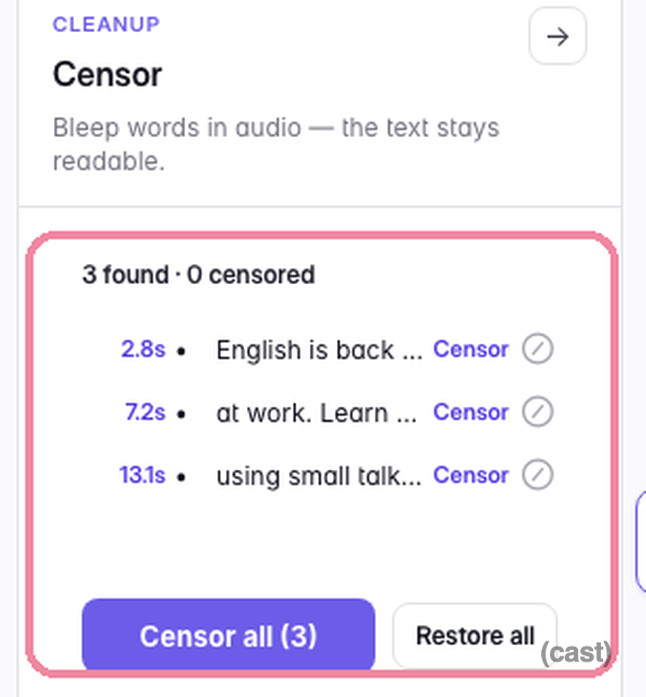
The Censor panel: flagged words listed with context and a Censor all button
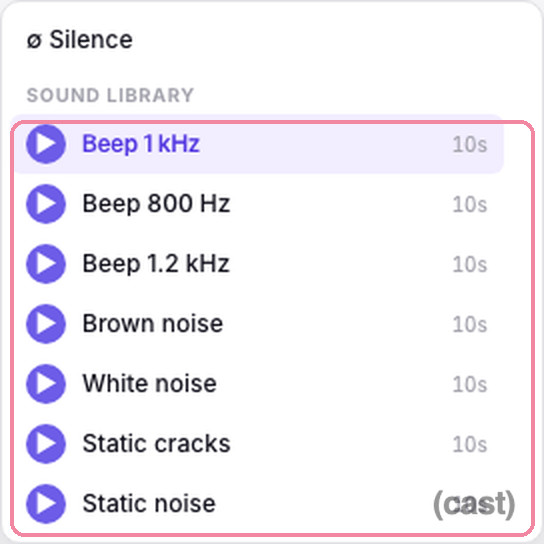
The mask sound library: silence, three beeps, white/brown/static noise, crackle
4. “It just sounds… amateur”
Echoey rooms, laptop-fan hum, a guest recorded on earbuds. Audio quality is the fear that makes people buy $400 of gear before episode one — and gear alone rarely fixes it, because the room is half the sound.
The half-solutions: more equipment (helps, costs, doesn’t fix the room), or running finished audio through a separate clean-up service like Auphonic — a genuinely good tool, but another account, another upload, another step after the edit.
The fix: treat clean-up as a switch, not a service. Cast’s Enhance runs noise removal and voice polish on your track inside the editor — flip it on, compare, keep it or not. To be fair to physics: a decent mic close to your mouth and a soft room still matter. Enhancement narrows the gap between your bedroom and a studio; it doesn’t teleport you there.
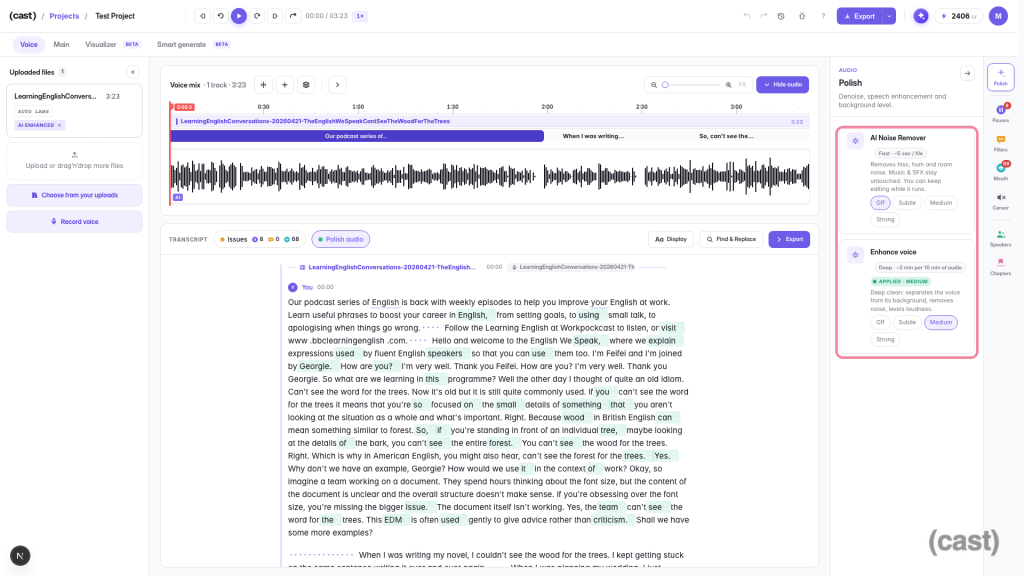
The Polish panel: AI Noise Remover and Enhance voice with four strengths
5. Music you’re actually allowed to use
Every podcaster meets copyright anxiety: that perfect track, and no idea whether using it gets the episode muted, claimed, or worse. Commercial music is effectively off the table — sync licensing is priced for TV. So podcasters comb “free music” sites and read license pages like contracts, because many free tracks don’t cover commercial podcast use.
The half-solutions: stock subscription libraries (Epidemic Sound, Artlist) are the standard answer — decent quality, but the license needs actual reading, the track is non-exclusive (your intro may already open other shows), and everything comes at catalog length, not your episode’s length. Our comparison of royalty-free music sources goes deeper.
The fix: generate the music instead of licensing someone else’s. Royalty-free music for podcasts generated on Mubert is safe by design — composed for your request, at your length, not pulled from a catalog that scores other shows too. On the Plus and Max plans, commercial use is covered and every export from Cast bundles a Creator license PDF per generated track — the paperwork ships with the episode (how that holds up when a platform asks questions is covered in our AI music licensing guide). Prefer picking from ready-made? The podcast music playlists are curated for exactly this. And it’s testable end to end on the Free plan: 100 credits a month, an intro take costs 5, and every price is shown before you hit generate. For picking the right style for your format, start with how to choose background music for your podcast; for building an intro that brands the show, see our podcast intro music guide.
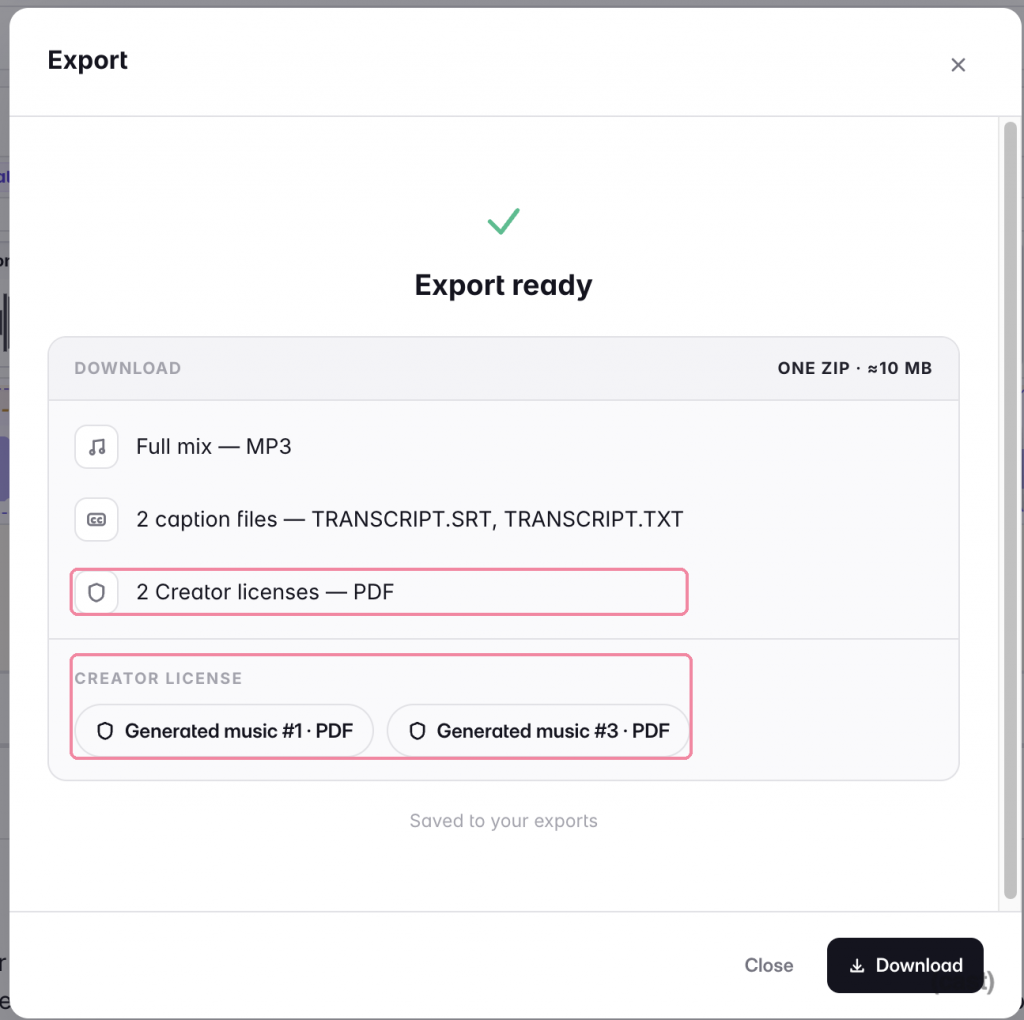
Export dialog listing the mix, captions and Creator license PDFs
6. Music drowning your voice
The second music problem is harder than the first: even a perfectly legal track will bury your voice if it just plays underneath at full volume. The traditional answer is manual gain automation — drawing volume keyframes around every spoken phrase, and redrawing them after every edit. It’s the single most tedious mixing task in podcasting, and the reason many shows either skip background music entirely or ship it too loud.
The half-solutions: keyframes in a DAW (hours, and you’re now an audio engineer), or sidechain compression (works, if you know what a sidechain is).
The fix: ducking should be automatic and visible. In Cast, a music lane ducks itself under speech: the editor knows where your voice clips are, so the music dips when you talk and swells back in the gaps — drawn as a curve right on the timeline. Want it deeper or gentler? Drag the curve (down to −24 dB) or switch it off per lane. And because generated beds come at exact episode length — hit Match and the bed is composed to, say, your 43:17 — there’s no loop-splicing either. We’re publishing a full guide to levels and mixing background music; until then, the background-music guide covers the choosing half.
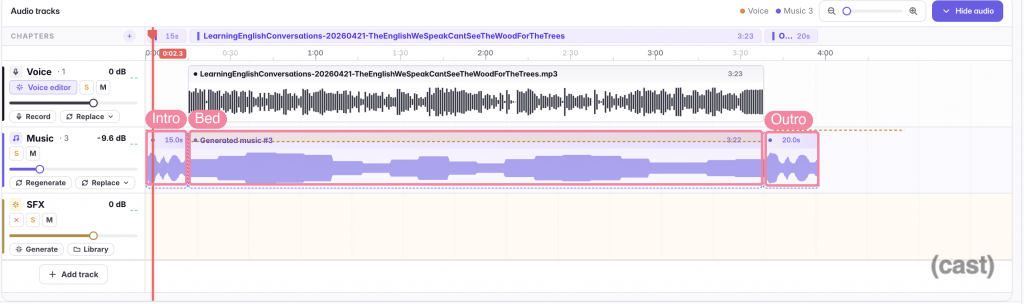
Timeline with intro, bed and outro; the ducking curve holds the bed under the voice
7. Every platform wants a different loudness
Publish the same file everywhere and it plays back at a different loudness on every platform — each one normalizes to its own target, and “sounds fine in my headphones” is not a target. The usual advice is a wall of jargon: LUFS, true peak, LRA.
The half-solutions: learning mastering, or another pass through a separate loudness service.
The fix: you shouldn’t need to know what −14 LUFS means — just where the episode is going. Cast’s export presets carry the target with the destination: Spotify and YouTube at −14 LUFS, Apple Podcasts at −16, broadcast EBU R128 on the Max plan, and a Master preset that skips normalization entirely if you finish elsewhere. Pick the platform; the two-pass loudness normalization happens on export. Need separate tracks for a producer? Stems export (voice, music, SFX as separate files) comes with Plus.
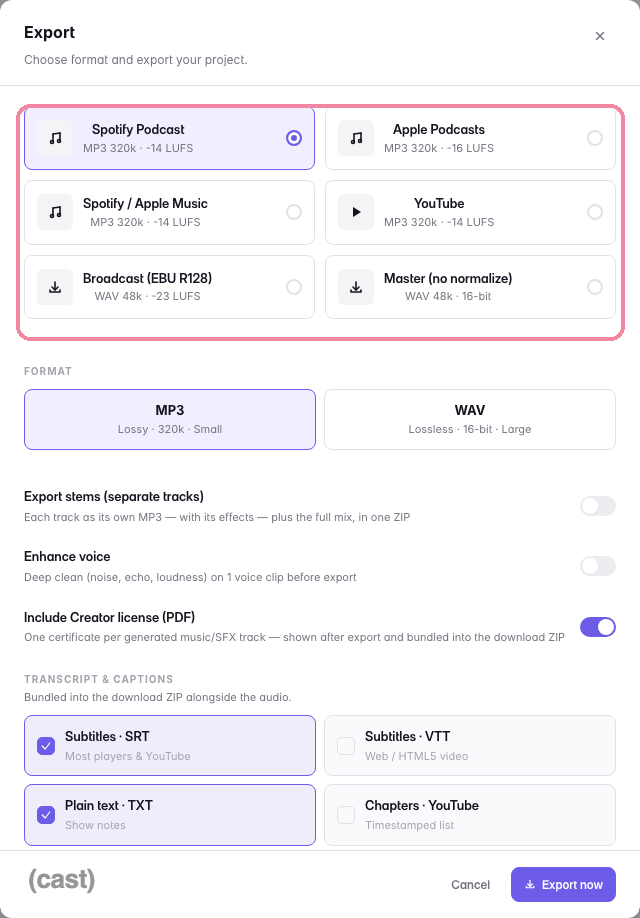
Export presets, each showing its LUFS loudness target
8. Transcripts, captions, chapters — the second job after the first job
The episode is done, and the work isn’t: a transcript for accessibility and search, captions for the video version, chapters for YouTube, show notes for the description. Each has its own tool, and together they add an hour per episode — which is why they usually just don’t happen.
The half-solution: separate transcription services, caption generators, and copy-paste.
The fix: if you edited by transcript, all of this already exists as a by-product. Cast exports SRT/VTT/TXT captions, YouTube chapter timestamps, Podcasting 2.0 chapter files, and the full transcript with speaker labels — bundled with the audio in one export, at no credit cost on any plan. The chapters you set while editing are the chapters your listeners scrub by.
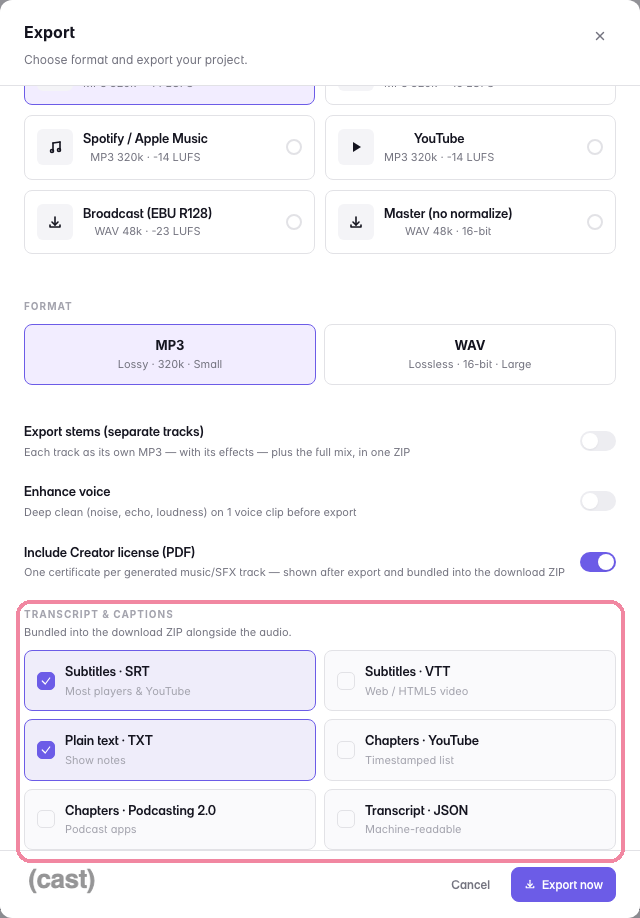
The transcript & captions picker in the export dialog
9. The podfade trap
Now the honest section. The stats above aren’t a tooling problem alone: 47% of podcasts stop within their first three episodes (Amplifi Media, 2022), and live industry data puts the share of shows still active after their first month at barely one in four (Podscan.fm, July 2026). Podfade is a habit failure, and habits fail when the cost per repetition is too high.
What actually helps, according to shows that survive: launch with a buffer of finished episodes so one bad week doesn’t break the streak; choose a sustainable format — a tight 20-minute solo show you can produce beats an ambitious panel show you can’t; schedule production, not just recording, because recording was never the bottleneck. And yes — everything in points 1–8 is really about this point. Cutting production from four hours to one doesn’t just save time; it lowers the cost of the habit that keeps the show alive past episode 20.
10. Growing the audience — and getting paid
Also honest: no editor fixes discoverability. Promotion is where podcasters get stuck most — 47% named it their biggest obstacle (The Podcast Host survey, 2021) — and the money follows slowly: 61% of podcasters earn less than $100 a month (Podbean, 2025).
What the evidence supports is unglamorous: a specific niche beats a general one (in a directory of ~4.8 million shows, “a podcast about business” is invisible; “a podcast about pricing for freelance designers” is findable — DemandSage, 2026); guesting on adjacent shows is the growth channel practitioners recommend most consistently; and consistency compounds — most of the competition quits (see #9). Captions, transcripts and chapters quietly help here too: they’re what makes episodes searchable and clippable. But there’s no growth hack in an audio editor, and we won’t pretend otherwise.
FAQ
Why do most podcasts fail?
Mostly production friction and unmet expectations, not bad content: 47% of shows stop within three episodes (Amplifi Media, 2022) and 41.7% of podcasts launched in the first half of 2026 are already inactive (Podchaser). The fix is lowering the cost of each episode — time, money, and decisions — until publishing weekly is sustainable.
How long does it take to edit a podcast episode?
Practicing editors budget 3–5 minutes per minute of audio, so a one-hour episode takes three to five hours of traditional editing. Transcript-based editing compresses most of that: cutting text, removing fillers and censoring by dictionary are minutes of review instead of a full listen-through.
How do I bleep swear words in a podcast?
The manual way: find each word by ear, silence it, and lay a beep underneath — an afternoon per talkative episode. The faster way is transcript-based censoring: Cast finds profanity by dictionary, you censor all hits in one click, choose beep or noise as the mask, and the words are masked in captions too.
What makes a podcast “explicit”?
Apple and Spotify leave it to your judgment — there’s no official swear-word threshold. The practical rule: if an episode contains uncensored profanity or adult themes, mark it explicit; a “clean” show is one where that content is censored or absent. Mislabeling can get a show flagged or pulled on some platforms, so when in doubt, tag it.
How loud should my podcast be?
Loudness is measured in LUFS, and platforms normalize to different targets: around −14 LUFS for Spotify and YouTube, −16 for Apple Podcasts. Rather than mastering by hand, export with a platform preset that applies the right loudness normalization for the destination.
Where to start
Don’t fix all ten problems this week. Fix the one that’s costing you the most:
- If editing is why you’re behind schedule — try one episode transcript-first. Record or upload into Cast — in the browser, nothing to install — cut by deleting text, run filler detection. Compare the clock against your usual edit.
- If music is what you’re avoiding — generate a bed and an intro on the podcast presets, drop them in, and let the ducking handle the levels. Free plan covers the whole experiment.
- If a sponsor wants a clean feed — run the profanity scan before your next export and see what one click catches.
- If you’re just tired — build a two-episode buffer before you publish again. It’s the single best podfade insurance there is.
The show doesn’t need you to be an audio engineer. It needs you to still be publishing in six months.
 Who we are