


Think of a podcast you love. Any podcast. Chances are you can hum its intro right now.
That’s not an accident. Podcast theme music is the closest thing audio has to a logo — a few seconds of sound that tells returning listeners “you’re home” and tells new ones what kind of show they just walked into. And yet most new podcasters treat intro music as a checkbox: grab a free track, slap it on the front, done.
The problem is that a generic intro does the opposite of what you want. It signals “this show sounds like every other show.” This guide covers how to get intro music for podcasts right: how long it should be, what assets you actually need beyond the intro itself, how to match the sound to your format, and how to create a podcast theme song that stays consistent episode after episode — without hiring a composer.


Your intro is your sonic logo
Radio figured this out decades ago. Jingles exist because sound builds recognition faster than almost anything else — hear three notes of a familiar theme and your brain fills in the rest.
For a podcast, the theme does three jobs at once:
- Recognition. In a directory of 4.8 million active shows (as of 2026), your theme is one of the few things that’s unmistakably yours.
- Expectation-setting. A true crime listener and a comedy listener should know within two seconds whether they’re in the right place.
- A quality signal. Fair or not, listeners judge production value in the first ten seconds. Clean, intentional theme music says someone cares about this show.
One thing intro music can’t do: save weak content. But if the episode is good, the theme is what makes it feel like a show instead of a recording.
How long should podcast intro music be?
Shorter than you think: 5–10 seconds as a sting after your cold open, or 15–30 seconds at most if it runs under a spoken welcome. Open any hosting dashboard and the retention graph explains why: the steepest listener drop-off happens in the first minute of an episode — exactly where a long musical intro sits.
The modern pattern looks like this:
- Cold open first. Start with a hook — the best quote from the episode, a teaser, a question.
- Then a short sting. 5–10 seconds of your theme. Enough to brand the moment, not enough to invite a skip.
- Then the content. Get to the point.
A 30-second wall of music before any voice was normal in 2018. Today it reads as filler. If you love a longer theme, save the full version for the outro, where nobody is waiting for you to get on with it.
Rule of thumb: your intro music should be 5–10 seconds as a sting, 15–30 seconds max if it runs under your spoken intro.
The anatomy of a podcast theme (it’s more than an intro)
“Intro music” is really a family of four assets, all built from the same musical idea:
| Asset | Length | Job |
|---|---|---|
| Intro | 5–15s | Opens the show; your sonic logo |
| Stinger / bumper | 2–5s | Punctuates transitions between segments — optional in short episodes, essential in segmented shows |
| Background bed | minutes, loopable | Sits under your voice in narrated sections |
| Outro | 15–30s | Closes the show; runs under the call-to-action |
The set matters more than any single piece. When your stinger is a two-second echo of your intro, and your outro resolves the same melody, the whole episode feels designed. That’s the difference between “music I found” and a sound identity.
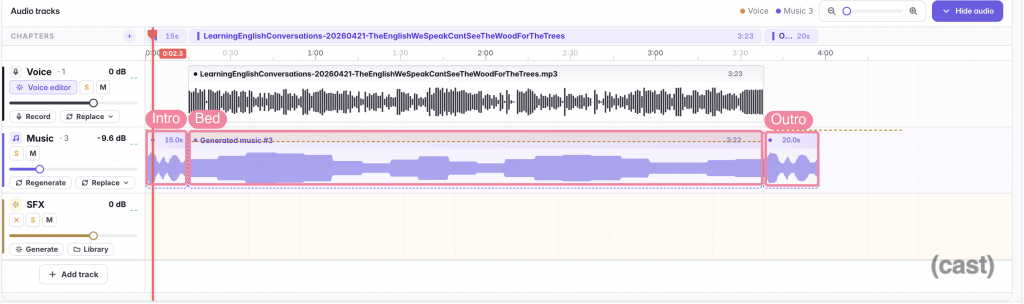
Podcast timeline with the three music parts labeled: a 15-second intro, a background bed running under the whole voice track, and a 20-second outro
The set on one timeline in Cast, Mubert’s podcast studio: a 15-second intro, a bed fitted to the episode, a 20-second outro. Crossfades are automatic, and the dashed envelope on the bed is ducking holding it under the voice. (A short single-topic episode like this one skips the stinger — segmented shows add it between topics the same way.)
(Background beds are their own craft — how loud, where, and how to keep them from fighting your voice. Start with our guide to choosing background music for your podcast, or grab a ready-made bed from the podcast playlists.)
Matching the sound to your show
There’s no “best” podcast theme music — only music that fits or fights your format. A rough map:
- Interview & conversation shows — warm, mid-tempo, organic instruments. You want “two people talking in a nice room,” not a movie trailer.
- True crime & narrative — dark ambient textures, sparse piano, tension without melodrama.
- Comedy — upbeat and a little absurd; funk, brass, or deliberately cheesy synths all work if they’re confident about it.
- Business & educational — clean, modern, forward motion: soft electronic pulses, light percussion. Authority without stuffiness.
- Wellness & mindfulness — slow attacks, soft pads, generous space. Nothing that spikes.
Two practical filters, whatever the genre. Instrumental beats vocals — sung lyrics compete with your voice and your listener’s attention. And pick something you can hear 100 times — you will, and so will your subscribers. Clever wears out; simple endures.
For fuller genre-by-genre guidance, see our guide to choosing background music for your podcast.
Where to get podcast intro music: three routes, honest trade-offs
1. Commission a composer. Bespoke, exclusive, exactly on brief — and $200–$2,000+ per cue. Revisions take days. For a new show that hasn’t found its identity yet, that’s a lot of money to spend on a guess.
2. License from a stock library. Fast and affordable, and quality is decent. Two catches: the perfect-sounding track is non-exclusive (that catchy theme may already open three other shows), and licensing terms need real reading — many “free” tracks don’t cover commercial podcast use. Our rundown of royalty-free music sources for podcasts goes deeper.
3. Generate it. AI music generation flips the trade-off: the track is created for you, on demand, at the exact length you need, royalty-free by default. You won’t get a Grammy-winning composition — but for a 5-second sting and a consistent set of show assets, generated music is now the fastest route to something that’s genuinely yours. A podcast intro music generator also makes iteration painless: don’t like take one, roll take two.
Step by step: generate your podcast intro in minutes
Here’s the whole flow inside Cast — Mubert’s podcast studio, and the app in every screenshot in this guide. From empty music lane to a branded intro sitting in your episode, powered by the same engine that has generated over 100 million tracks.
1. Open the music generator and pick a preset. Voiceover BG and Educational are tuned to sit under speech; Dramatic or Epic if your show opens hot. Whichever you pick, keep it — the preset is your show’s sound.
2. Choose the kind of track: Intro / outro. This is the part catalogs can’t do. You’re not searching for a track that happens to be short — you’re generating one that’s structured as an opener.
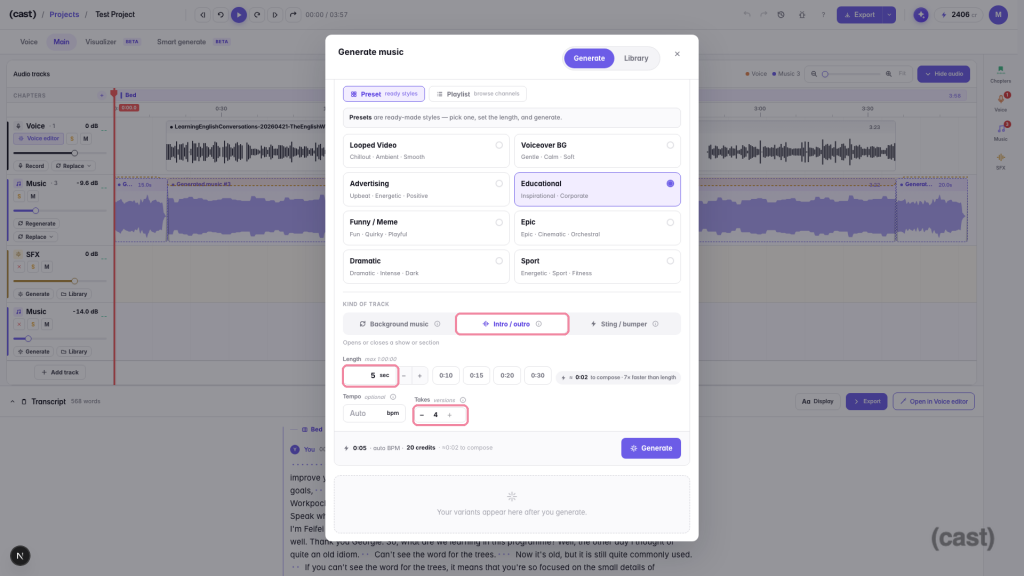
Generate music modal with the Educational preset selected and the key controls highlighted: kind of track set to “Intro / outro”, length 5 seconds, and 4 takes”
Preset, kind of track, exact length, number of takes — the whole brief fits on one screen.
3. Set the exact length. Five seconds for a sting, fifteen for a fuller intro. No trimming a 3-minute track down to its one good bar — the music is composed to end where you need it to. For background beds there’s a shortcut: hit Match and the track is composed to your episode’s exact duration.
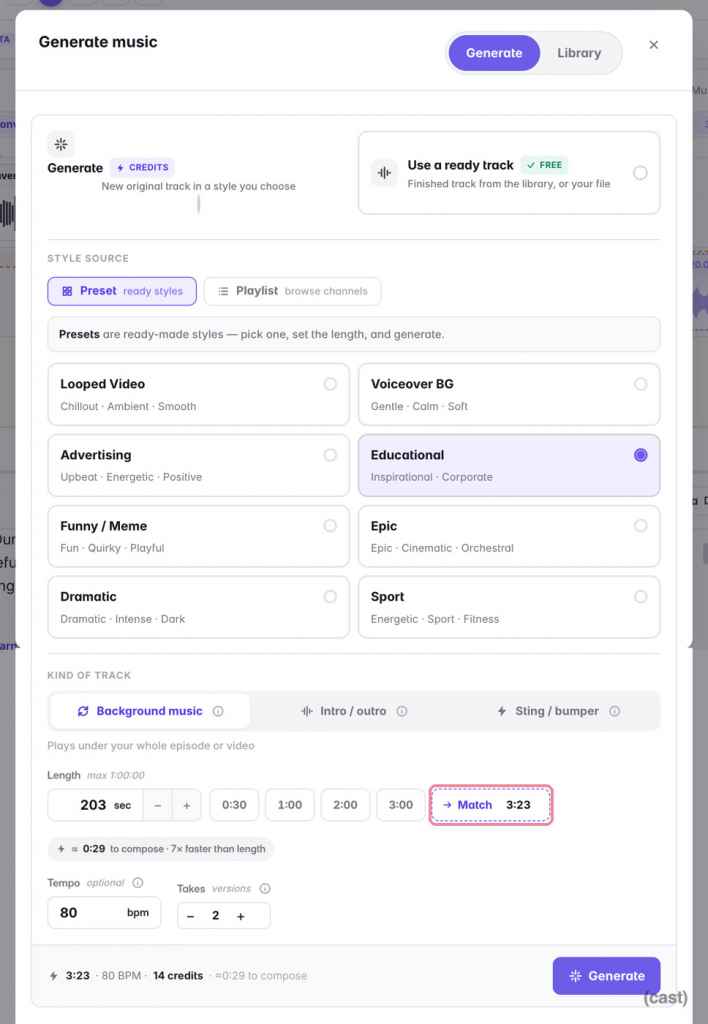
Generate music modal with the Educational preset selected, Background music kind, and a Match button that has set the length to the episode’s duration of 3:23
Type a number — or hit Match and the bed is composed to the episode’s exact length (here 3:23), price printed before you generate.
4. Ask for several takes. Generate up to four versions of the same brief side by side, compare, keep the winner.
5. Turn one track into the whole set. Your theme is saved to your Cast library, so reuse it: run the full track as the outro, place it again and trim the first five seconds for the intro, clip a two-second accent for a stinger. One melody, four assets — the sound identity from the anatomy table, built from a single generation. And when you need the same theme longer or shorter, re-render it at a new length: the composition stays, the duration changes.
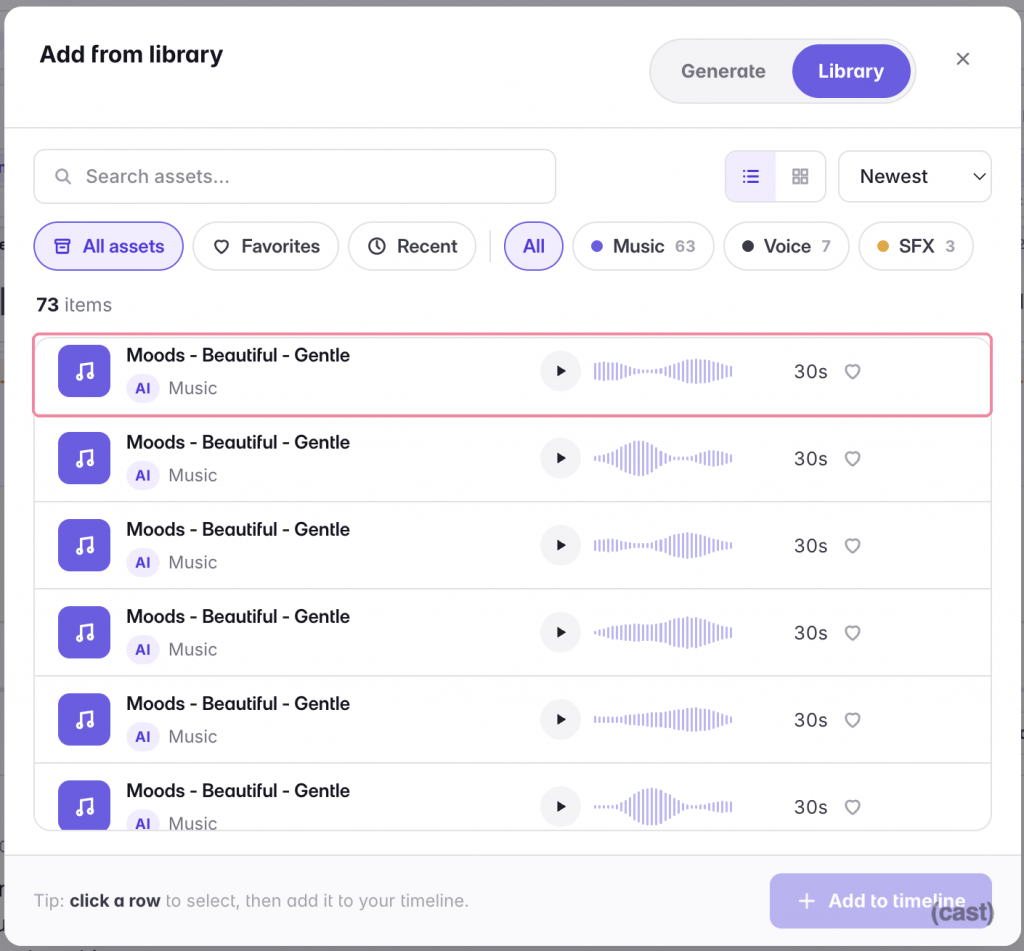
Add from library modal listing previously generated music tracks with play buttons and an Add to timeline action
Every generated take lives in your library — add the theme again, trim it, and the intro and stinger cost nothing extra.
6. Drop it into the episode. The intro lands on your music lane next to your voice track — and background beds arrive already ducking under speech, no volume keyframes required.
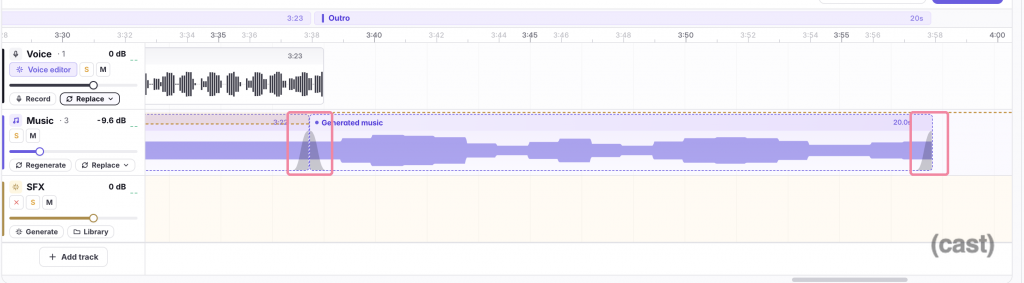
Timeline near the end of the episode: the bed fades out into the outro clip, and the outro fades out at the very end — both fade curves highlighted
Seams you never drew: the bed hands off to the outro, the outro tails out at the end — crossfades are applied automatically when clips meet.
From brief to placed intro: a few minutes, no audio engineering degree. And you can build the whole thing on Cast’s Free plan: it ships with 100 credits a month, an intro take costs 5, a whole-episode bed about 14 — you saw both prices in the screenshots above. Editing, transcription and MP3 export never use credits on any plan — the full breakdown of plans and credit costs lives in the Cast docs.
Keep it consistent — without letting it go stale
Consistency is what turns a track into a theme: same opener, every episode, until listeners could identify your show blindfolded.
The craft is in varying everything around a stable core — variations on one musical idea, not thirteen unrelated tracks. Generated music gives you three dials a static catalog can’t offer: re-roll fresh takes of the same brief when a cue feels tired; swap the instruments on your existing theme, so the melody stays while the arrangement freshens; or re-render the theme at a new length for a holiday special or a segment that grew. The tune your listeners recognize never changes — everything around it can.
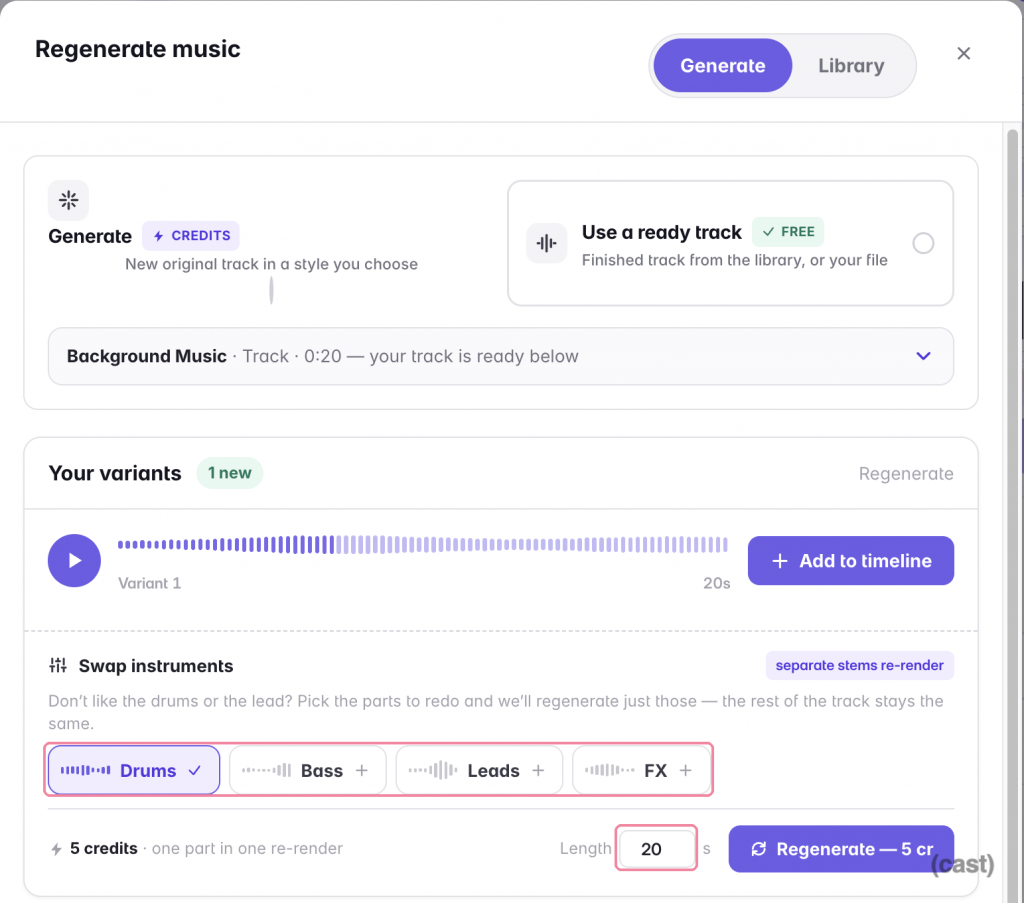
Regenerate music modal showing a new 20-second variant of an existing track and Swap instruments options for drums, bass, leads and FX
Re-render the same track at a new length, or redo just the drums — the rest of the track stays the same.
Change the core theme rarely and deliberately, the way brands redesign logos. If year two demands a fresh sound, evolve the existing theme rather than replacing it cold.
The licensing part (read this before you publish)
Whatever route you choose, your license needs to cover four things for podcasting specifically:
- Commercial use — the moment you add ads or sponsors, “personal use” licenses stop covering you.
- Distribution across platforms — Spotify, Apple Podcasts, and YouTube, where Content ID actively scans audio.
- No attribution requirements — or be ready to credit the composer in every episode description, forever.
- Clarity on perpetuity — some subscription libraries only cover episodes published while you’re subscribed.
Music generated on Mubert is royalty-free, and the Plus and Max plans cover commercial use: every export from Cast bundles a Creator license PDF for each generated track, so the rights paperwork downloads together with the episode — ready for the day a platform or sponsor asks you to show it. No provider can promise a claim will never happen; what a good one gives you is clean provenance and paperwork that resolves questions fast. More on how that works in our AI music licensing guide.
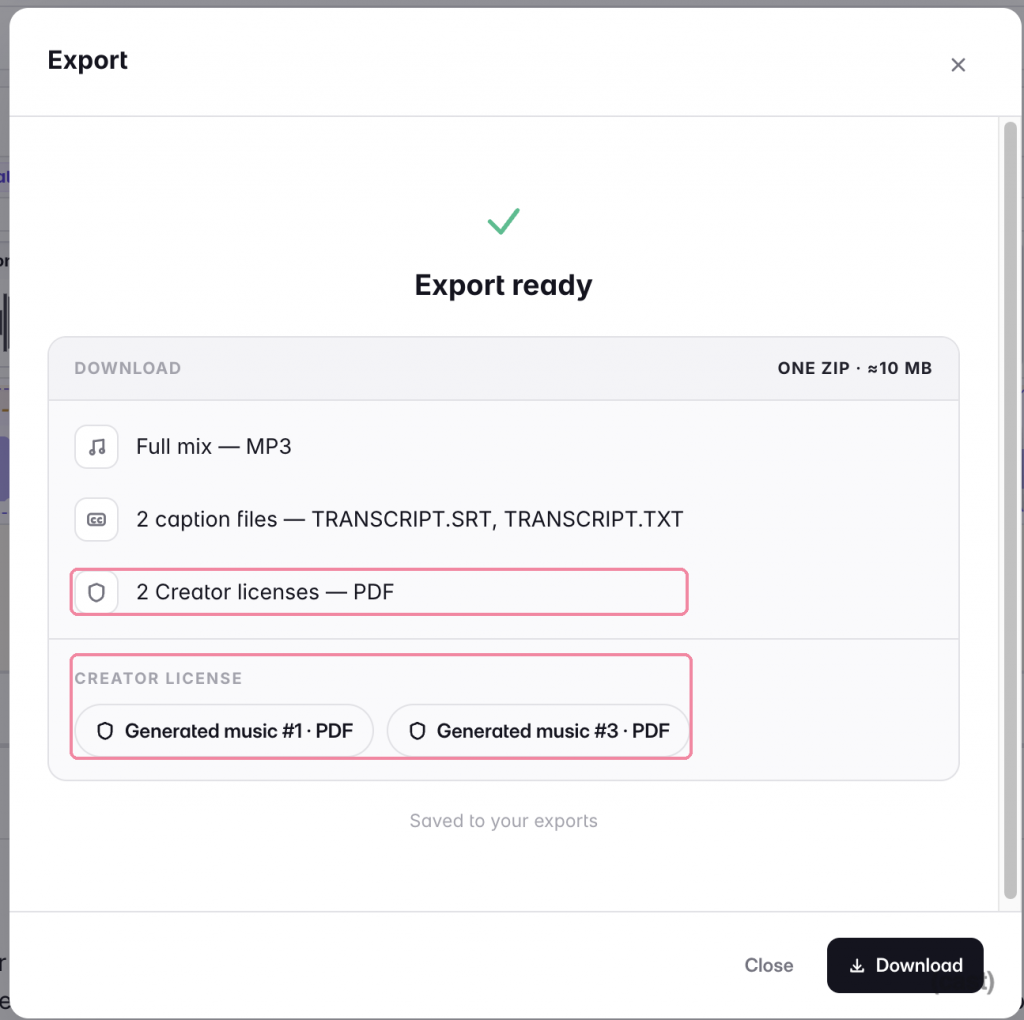
Export-ready dialog listing the download contents: the full mix as MP3, two caption files, and two Creator licenses as PDFs — one per generated music track
The paperwork ships with the episode: one Creator license PDF per generated track, bundled into the same export.
FAQ
How long should podcast intro music be?
5–10 seconds as a sting after your cold open; up to 30 seconds if it runs under a spoken intro. Shorter than you think — long musical intros are the most-skipped part of any episode.
Does my podcast really need theme music?
Strictly, no. But a theme is the cheapest branding a show can buy: it builds recognition, sets tone, and signals production quality in seconds. Even minimalist shows benefit from a short, consistent sting.
What’s the difference between intro music and a podcast theme song?
A theme song is the musical idea; intro music is one of its jobs. A complete theme covers the intro, a short stinger for transitions, a loopable background bed, and an outro — all recognizably the same sound.
Can I use popular music for my podcast intro?
Not without licenses you almost certainly can’t get. Commercial tracks need sync and master-use clearance from labels and publishers — a process priced for TV budgets. Royalty-free or generated music exists precisely so you never have that problem.
Can I make podcast intro music for free?
Yes — Cast’s Free plan includes 100 credits a month, and a 5-second intro take costs 5 credits, so a full theme set with several takes fits comfortably. Editing, transcription and MP3 export don’t use credits on any plan; a commercial-use license comes with the Plus and Max plans.
Where can I get royalty-free intro music for a podcast?
Stock libraries (Epidemic Sound, Artlist), free archives with careful license-reading, or an AI generator that composes a new royalty-free track at your exact length — see our full comparison of sources.
Can I change my podcast theme music later?
Yes — shows rebrand their sound like companies redesign logos. Do it rarely and deliberately, and evolve the existing theme when you can — swap its instruments or re-render it at a new length — so returning listeners still recognize the show.
Getting started today
- Listen to three shows in your niche. Note what their themes signal in the first five seconds.
- Write a one-line brief. Mood + genre + energy: “warm, curious, mid-tempo, light electronics.”
- Generate a 5-second intro and a 2-second stinger from that brief — start free with the podcast presets and pull a few takes. Nothing to install.
- Test against your actual voice. Drop the takes into your episode in Cast and play the hand-off: intro, then your first thirty seconds. It should hand off, not collide.
- Commit for a season. Consistency beats perfection — a decent theme used everywhere outperforms a perfect one you keep replacing.
Your show already has a voice. Give it a sound to match.


 Who we are